Version 5.1 · Built-in AI agent · 391 nodes

Camera to inference to PLC — wired, not coded.

Cameo Image Studio is a node-graph workbench for machine vision. Drag a camera node, wire it into GPU inference, wire that into a PLC or a motion axis, and watch the whole line run — without writing a build script. When you do need code, the graph exports to C++, Python or a standalone EXE.

Windows 10/11 64-bit only. Setup is a small download that pulls the rest — CUDA, PyTorch, OpenCV, ONNX Runtime and an embedded Python — while it installs, so there is nothing to set up by hand.

391nodes in the catalogue
9interface languages
5camera vendors supported
C++ · Pygraph exports to code
Node graph editor

AI assistant

The agent sits inside the graph

Not a chat window bolted to the side. The assistant reads the node catalogue, builds the pipeline, runs it, looks at the frames that come back, and changes its own parameters until the inspection passes.

AI assistant

Describe the inspection, get the graph

The built-in assistant reads the node catalogue and builds pipelines from a sentence. It can see the frames your nodes produce, attach an image or a PDF spec, run the pipeline and read back the result — then change parameters and try again.

  • Creates nodes, wires them and sets parameters, with validation and rollback
  • Writes custom C# nodes for steps the catalogue does not cover
  • Runs against a licensed server — a per-machine key, no API key to manage
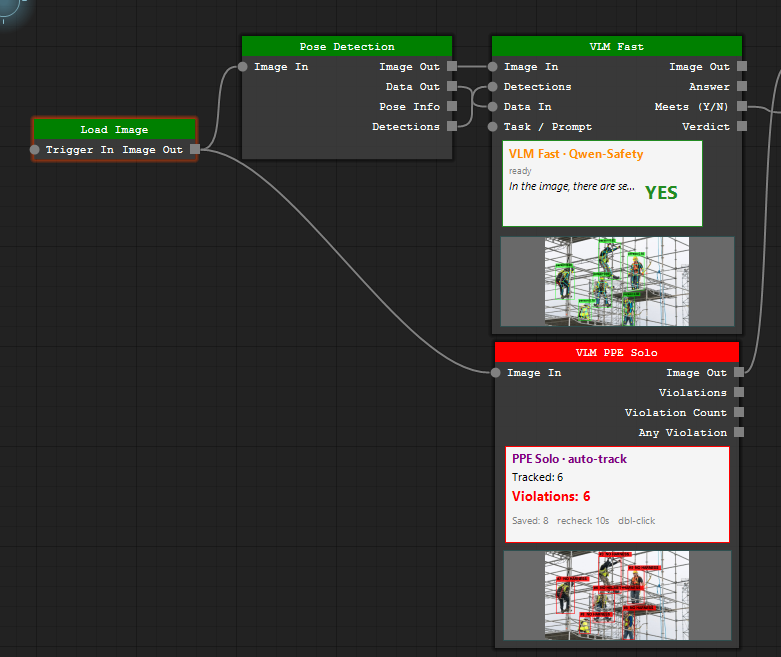
Vision-language

Ask the frame a question

Wire an image and a sentence into a vision-language node and read the answer off a port. Ask whether every worker on the scaffold is wearing a harness and the graph hands back a verdict, a violation count and the boxes behind it — with no class list trained in advance.

  • Yes/no verdicts, free-text answers and violation counts on typed ports
  • PPE and safety checks that track each person and re-check on an interval
  • Runs beside the detector, so the box and the answer come from the same frame
Vision-language safety nodes

Graphs, running

Stills and screen recordings straight from the shipping build — no mock-ups. Every node previews its own output on the body, so each one shows what that step really produced.

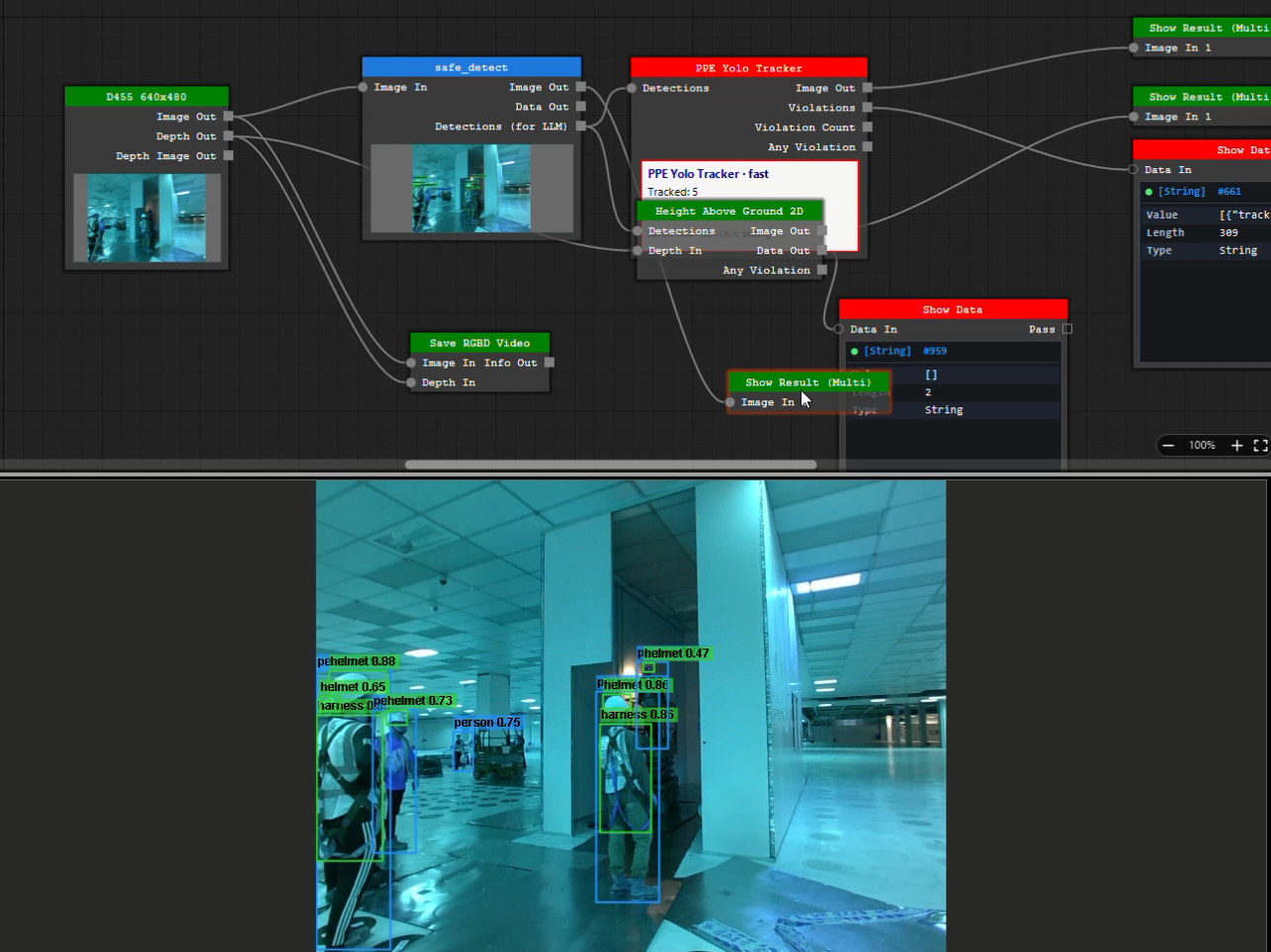
PPE safety graph
D455 → safe_detect → PPE Yolo Tracker → Show Result A depth camera into a safety graph: safe_detect finds the people, the PPE tracker checks each one for a helmet and a harness — five tracked in this frame — and Height Above Ground 2D takes the same detections with the depth stream and raises its own violation flag.
RGB · D455 stereo depth · Cameo AI depth One RealSense D455, two depth maps of the same shot: the camera’s own stereo depth (top right) goes flat and drops out in patches past the first few metres, while the AI depth below reads that same RGB frame and still separates the floor, the columns and the scissor lift.
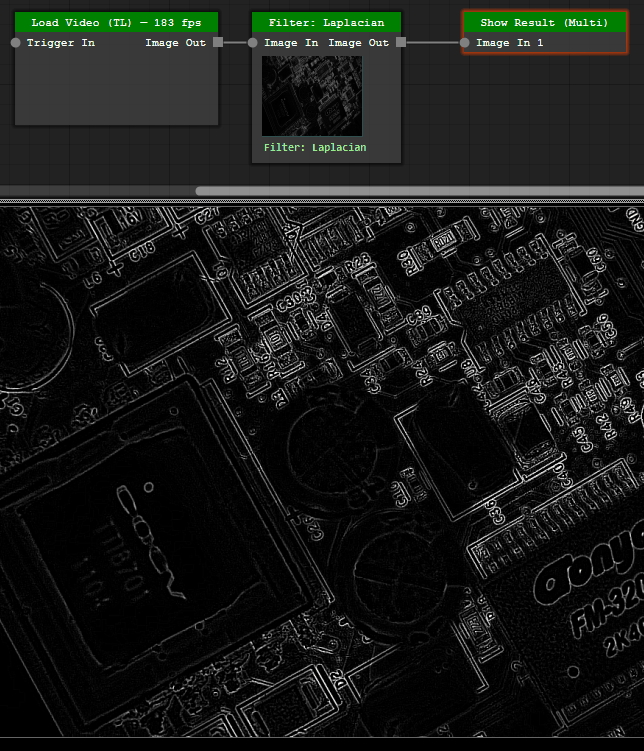
Laplacian filter at 183 fps
Load Video → Filter: Laplacian → Show Result A Laplacian on every frame of the same PCB clip at 1280×720. The loader’s own counter reads 183 fps with the filter in the chain — about 169 megapixels a second, on an AMD Ryzen 7 5000-series machine.
Load Image → Shape Detect → Show Result — all of it built by the assistant A sentence and a photo of the board: segment the rectangular chip. The assistant builds the three nodes, sets Invert, MinArea 8000 and a square/rectangle filter, and runs the graph — Shape: 0 found. It reads back its own overlay, works out that its own filter threw the chip’s contour away, clears it and runs again: a contour closed tight around the QFP.

What the graph can do

Five capabilities that normally live in five separate tools, on one canvas.

Node graph

One canvas, 391 nodes

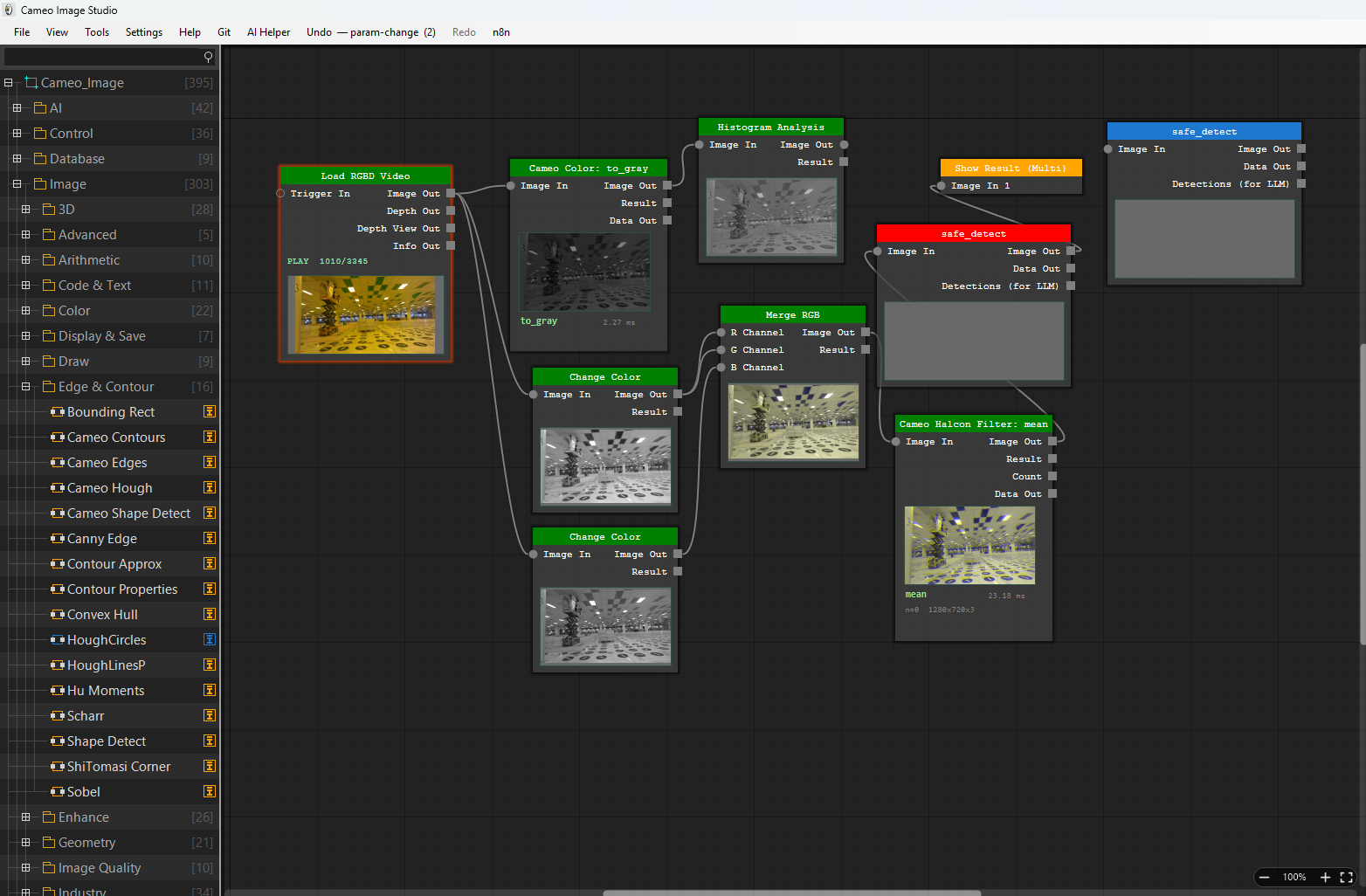
Every operation is a node with typed ports: load an image, threshold it, find blobs, run a detector, gate on distance, write a coil. Wires carry frames, detections, poses, depth maps and numbers. Nodes preview their own output on the body, so you see where a pipeline goes wrong without stopping it.

  • Free-run threading — the pipeline keeps its frame rate while you edit
  • Undo, autosave and crash recovery on the graph itself
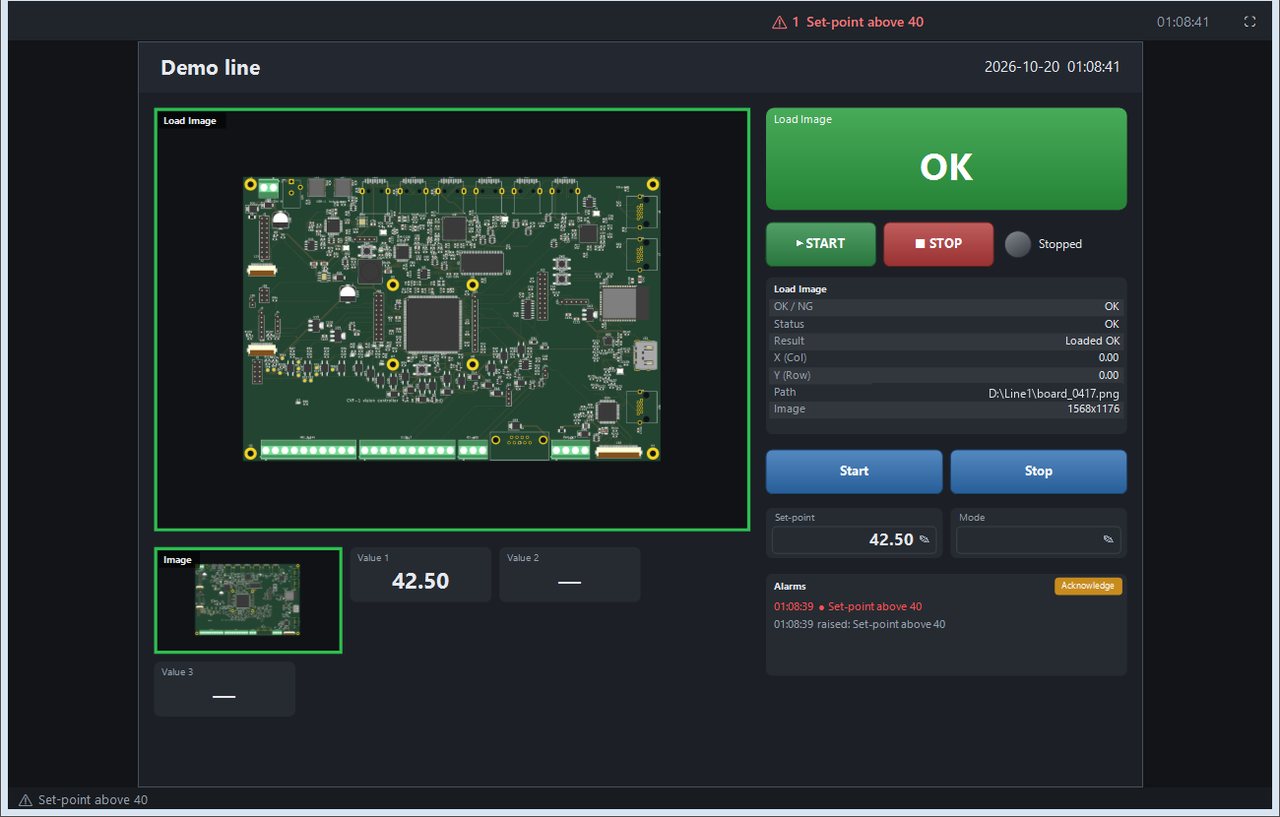
  • Run Mode: a locked, read-only operator screen with a results dashboard
Node graph editor
Labeling

Label datasets where you use them

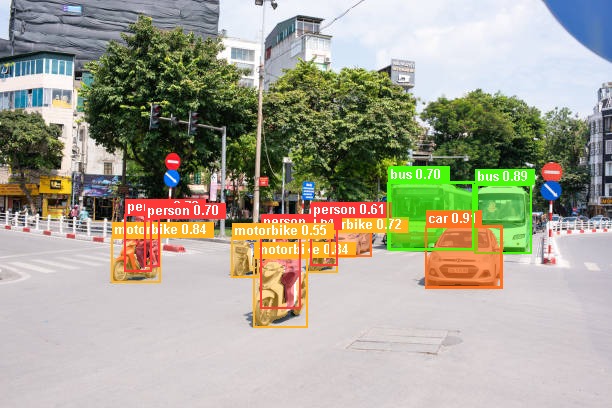
Annotate boxes and polygons, export to YOLO or COCO layout, and feed the result straight into a training node in the same project. Text-prompted segmentation (Grounded SAM) can pre-label a batch before a human touches it.

  • Bounding box, polygon, class filter with per-class confidence
  • Detects a LabelMe install and hands off to it when you prefer that tool
  • Frame stacking, crop-per-detection and super-resolution as dataset nodes
Auto-labelled detections on a street scene
Neural networks

Draw the network, then train it

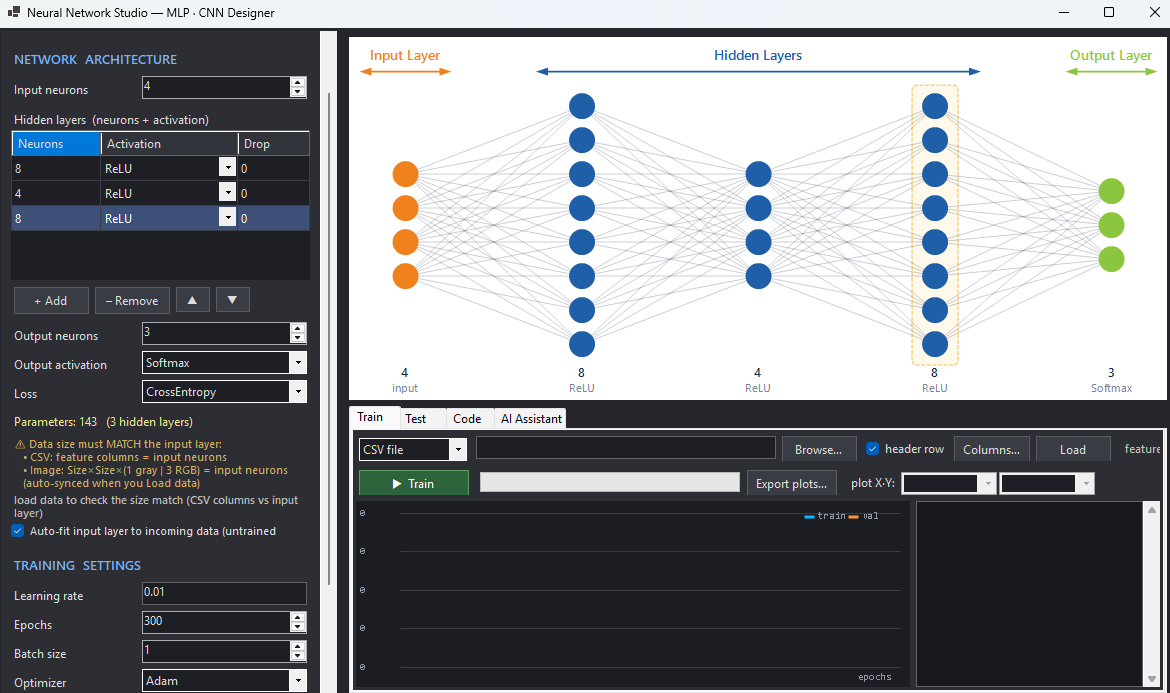
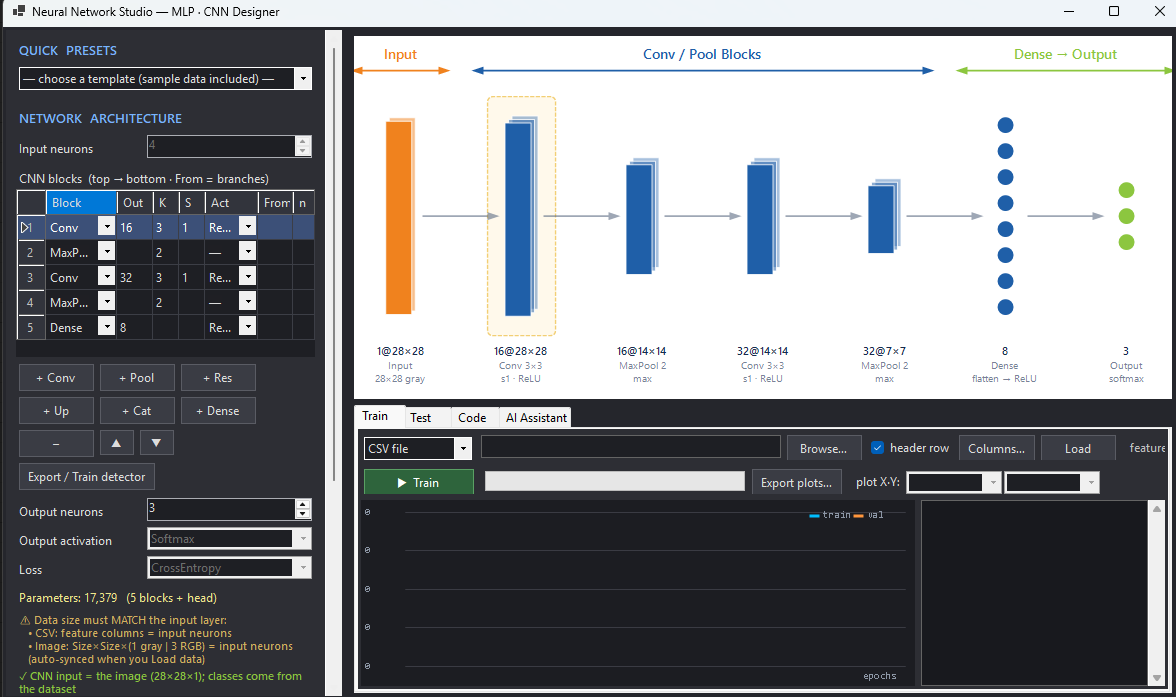
A graphical designer for MLP and CNN layers, plus a YOLO-style block table that exports the same YAML the training toolchain expects. Load .onnx or .pth weights, run inference on the GPU, quantise to INT8 for an STM32 target.

  • ONNX Runtime with CUDA, falling back to CPU when no GPU is present
  • Detection, segmentation, pose, depth, anomaly detection and OCR nodes
  • Reinforcement-learning studio with 12 classical methods for tuning loops
MLP designer CNN block designer
Control

The result has to move something

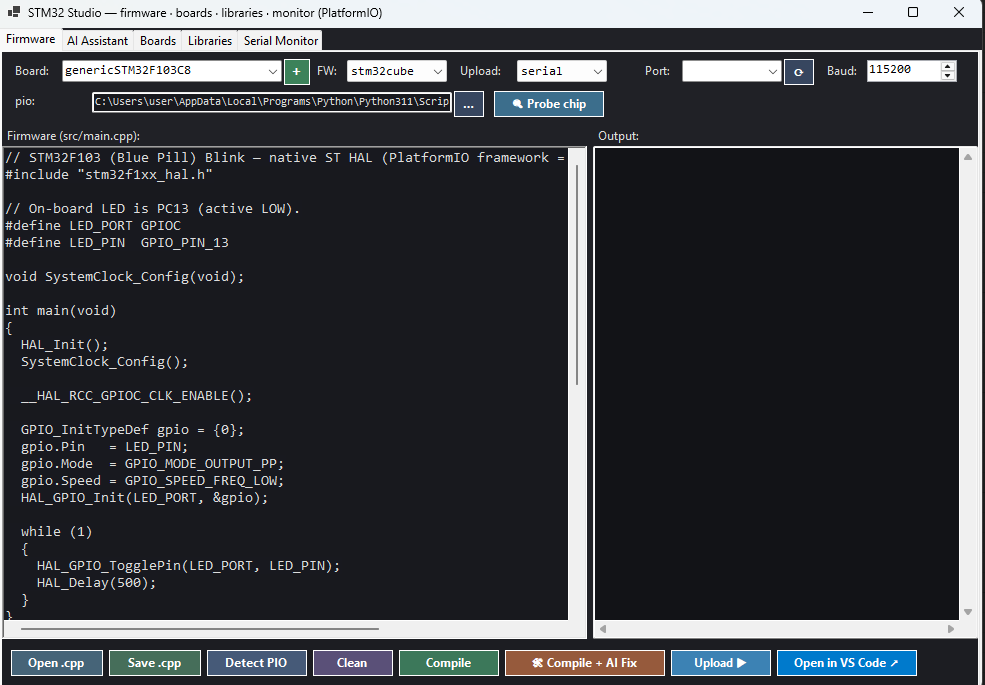
Vision that cannot actuate is a demo. Wire a verdict into a PLC coil, a motion axis, a GPIO on a microcontroller or an MQTT topic. Firmware for STM32 and Arduino is generated, compiled and flashed from inside the app.

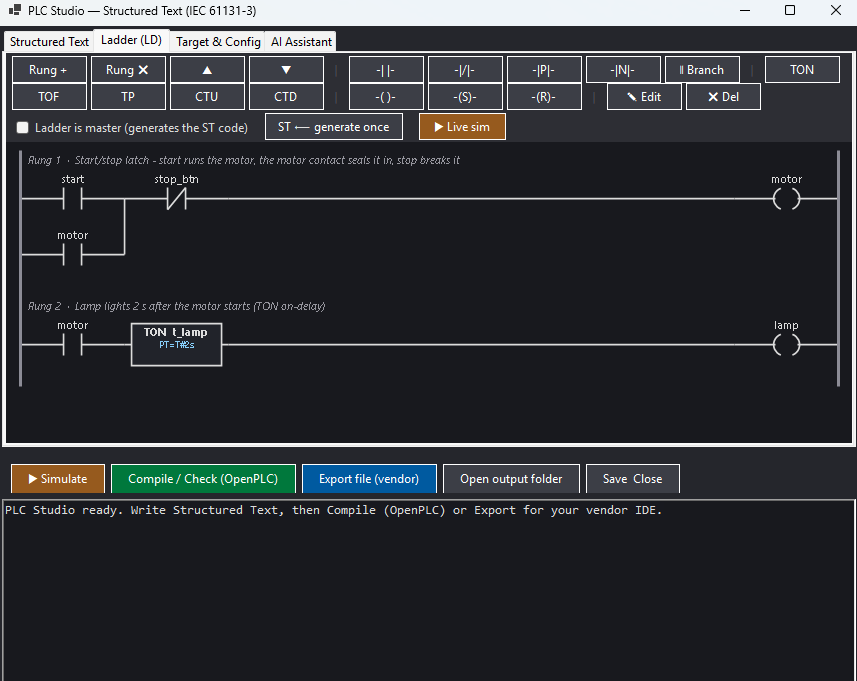
  • PLC: Mitsubishi MC · Siemens S7 · Omron FINS · Modbus TCP · TwinCAT ADS
  • Motion: GRBL, Modbus and ADS axes, soft motion, nine-point calibration
  • MCU/FPGA: STM32 (PlatformIO), Arduino (arduino-cli), Verilog (Vivado / Quartus)
Ladder logic editor STM32 firmware studio
IoT & phone

The result leaves the machine

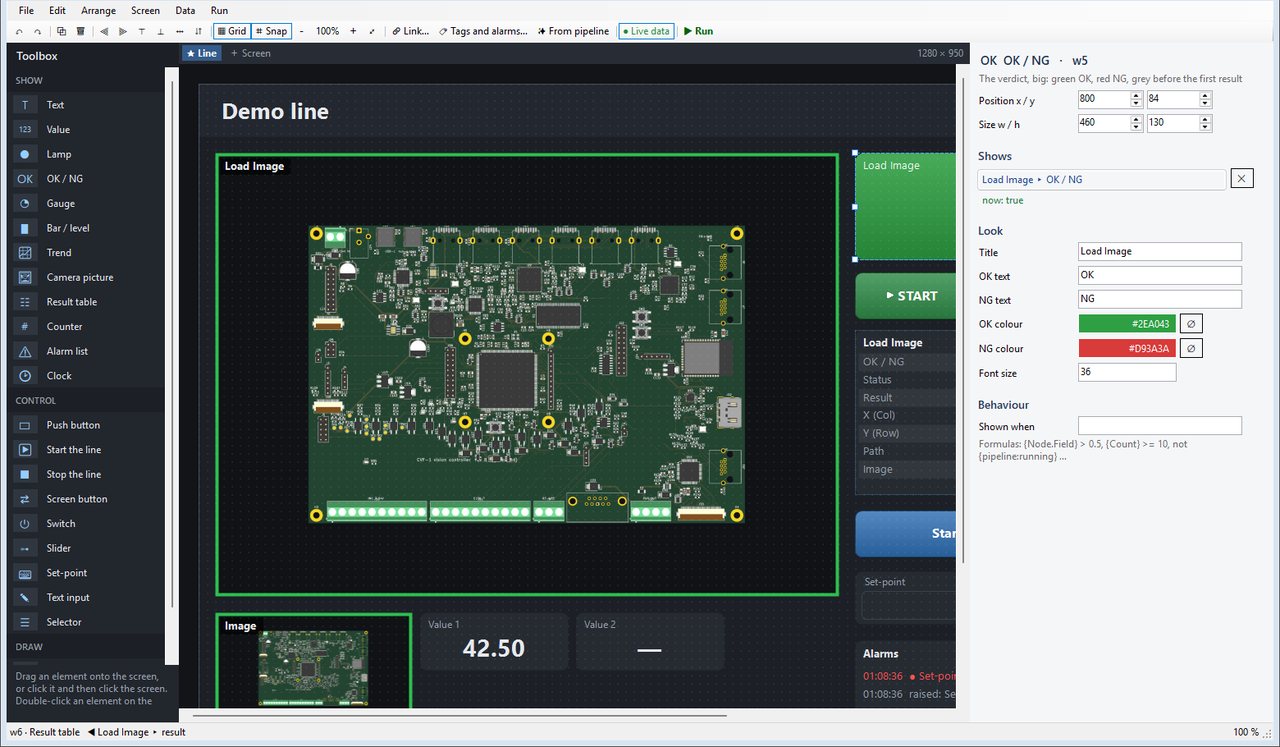
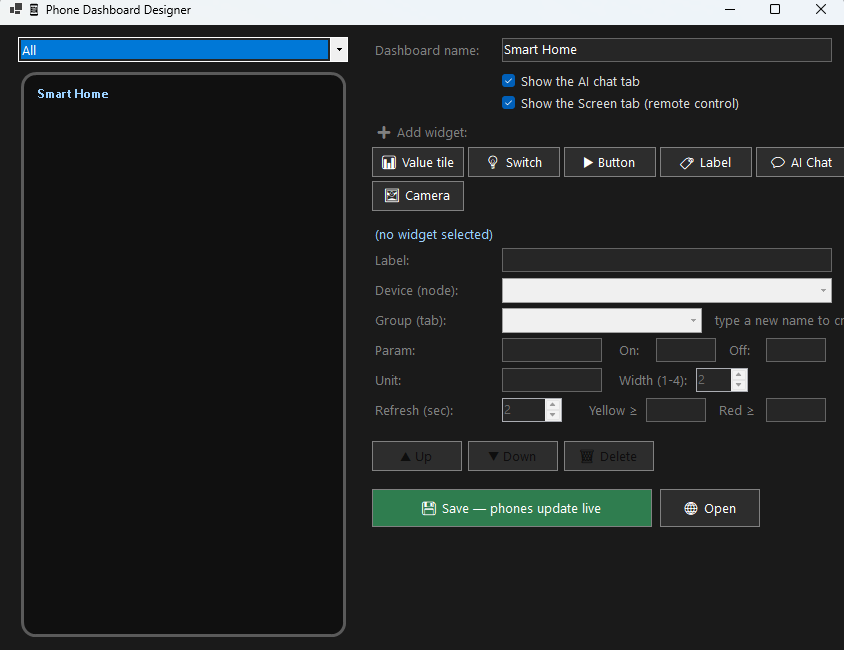
A verdict that stays on the inspection PC helps nobody. Publish it to an MQTT broker with the frame attached, POST it to a webhook — Telegram, LINE, ThingsBoard, anything that reads JSON — or lay the phone screen out in the designer and hand the operator exactly the tiles you chose. Save, and any phone already open redraws itself in seconds.

  • MQTT publish (verdict, score, JPEG) and subscribe — a sensor or a push-button fires the pipeline
  • Value tiles, switches, buttons and camera pictures, grouped into tabs, installable as a PWA
  • A Screen tab mirrors the app window and sends taps back — LAN and a token by default, a PIN for that tab
Phone dashboard designer

What it talks to

Verified in the shipping build. Anything not listed here is not claimed.

Cameras & sources

  • Hikvision MVS (GigE / USB3)
  • Basler pylon
  • The Imaging Source (GigE)
  • MindVision USB
  • Intel RealSense (colour + aligned depth)
  • RTSP · MJPEG · HLS · HTTP
  • Image folders and video files

Control & fieldbus

  • Mitsubishi MC protocol
  • Siemens S7
  • Omron FINS
  • Modbus TCP / RTU
  • Beckhoff TwinCAT ADS / EtherCAT
  • GRBL motion
  • MQTT · HTTP request

Code & firmware targets

  • C++ standalone project
  • Python (runs on Linux)
  • Headless EXE deployment
  • STM32 (PlatformIO)
  • Arduino (arduino-cli)
  • Verilog / HLS (Vivado, Quartus)
  • IEC structured text and ladder for PLCs
  • Image library for ARM64, ARMv7 and bare-metal Cortex-M

Download

One setup file. It fetches the rest of the runtime while it installs.

The machine needs internet while it installs. Setup downloads the core runtime as it runs. The optional add-ons — the Python environment, the Halcon and Hikvision SDKs, the bundled AI models and LabelMe — stay on the server until you switch them on under Tools > Components. Once installed, the application itself runs offline.
Not code-signed yet. Windows SmartScreen will warn you on first run. Check the SHA-256 above against your download before you click through that warning — that check is what a signature would have given you.

Cameo image library

The C++ image library the application itself runs on, packaged for your own programs. The modules import nothing but the operating system and the Microsoft C++ runtime — no OpenCV, no LibTorch, no BLAS.

Windows x64

One DLL per module, the single-file build the C# binding loads, import libraries, headers, and the C# and Python bindings.

Size
Modules
Download all modules (archive)
SHA-256

Linux x64

The same modules built as shared objects with g++ 15, plus the headers and the Python package. The C# binding loads the single-file Windows build, so on Linux the way in is C, C++ or Python.

Size
Modules
Download all modules (archive)
SHA-256
What you have to supply yourself. A license.lic at run time — the same file that unlocks the application — plus the Microsoft Visual C++ 2015-2022 x64 runtime on Windows. Nothing else: no OpenCV, no LibTorch, no BLAS. The P/Invoke table showing how to call every exported function ships inside, under csharp/.

Beyond Windows

The same library, running on the board

The application needs Windows. The library does not. The same C++ modules build for embedded Linux on ARM and for a Cortex-M with no operating system underneath — they import nothing but the C runtime, so there is no OpenCV, no BLAS and no Python to cross-compile first.

Linux ARM64

For 64-bit Cortex-A boards running Yocto, Buildroot or a Debian-based image — Jetson, Raspberry Pi 4 and 5, Rockchip, i.MX8. Shared objects, headers and the Python package, the same way in as the x64 build. The archive ships with a README, the headers, the cameo Python package and six worked examples showing how to call it from Python.

Size
Modules
Download all modules (archive)
SHA-256

Linux ARM 32-bit

The same modules for a 32-bit Cortex-A with hardware floating point — i.MX6, Allwinner, the older Raspberry Pi images. Shared objects, headers and the Python package. The archive ships with a README, the headers, the cameo Python package and six worked examples showing how to call it from Python.

Size
Modules
Download all modules (archive)
SHA-256

Cortex-M, no OS

Built inside the app

Nothing to download here. The application builds this target itself: pick the modules a bare-metal microcontroller can carry, and it compiles them for arm-none-eabi and links the static archive into the firmware it generates — the same flow that flashes STM32 and Arduino.

Get the application
What an embedded build is, and what it is not. It is the image library — filters, geometry, measurement, blob, barcode, OCR and the neural-network module — compiled for the target. It is not the application: the node editor, the training studios and the AI assistant stay on Windows. Inference on these boards runs on the CPU, since the modules carry no CUDA. At run time each build wants the same license.lic that unlocks the application.

Request an activation key

The application runs offline, but the AI assistant is licensed per machine. Install first, open Tools ▸ AI Settings, copy the Machine ID it shows, and send it with this form.

Shown in Tools ▸ AI Settings, or by running Cameo_Image.exe --ai-check. Leave this blank if you have not installed yet — we will send instructions instead.

Used only to issue and support your licence. Not passed to anyone else.

System requirements

These are the requirements for the Windows application — there is no macOS build, and the Linux port of the application is not released. The image library is the part that leaves Windows.

Item Minimum Recommended
Operating system Windows 10 64-bit Windows 11 64-bit
CPU 4 cores, x86-64 8 cores or more
RAM 8 GB 16 GB or more
GPU None — inference falls back to CPU NVIDIA RTX 3060 or better, current driver
Disk 30 GB free (SSD) 60 GB free for datasets and recordings
Fetched by the installer Visual C++ x64 runtime, Microsoft Edge WebView2, CUDA and cuDNN libraries, PyTorch, OpenCV, ONNX Runtime and an embedded Python environment. Setup downloads them for you — nothing to install by hand, but the machine needs a connection during the install.

Questions

How much does it actually download?

The setup file itself is small — the exact size and hash are on the download card above. During the install it fetches the core runtime: CUDA and cuDNN, PyTorch, OpenCV with GPU support, ONNX Runtime and a complete Python environment. That figure is on the card too. The optional add-ons are downloaded later, from Tools > Components, and only the ones you switch on.

Do I need a key to use the application?

The vision pipeline runs without one. The AI assistant is licensed per machine: you send the Machine ID shown in the app and receive a key bound to that computer. A key issued for one machine will not work on another.

Is the download signed?

Not yet. Code-signing certificates are being arranged. Until then, verify the SHA-256 hash published next to the download — it detects a tampered or truncated file just as reliably.

What format are project files?

Projects save as plain .json: nodes, parameters and links, readable in any text editor and easy to keep in version control. The .mcameo extension you may see is a separate tensor container used for model weights, not a project.

Can it run without a GPU?

Yes. Detection and segmentation fall back to CPU automatically. Expect a large speed difference — heavy models are usable on CPU for testing, not for line rate.

Is there a macOS or Linux build?

No macOS build exists, and there is no Linux build of the application. The C++ image library is a different matter — it builds for Linux and the .so are in the download section above. For a pipeline, the practical route to Linux today is to export it as Python or C++ from the Windows application and run that on the target.

Can any of this run on an embedded board?

The library can. It builds for embedded Linux on 64-bit and 32-bit ARM, and for a Cortex-M with no operating system, so the inspection itself runs on the device — the Embedded section above says what each target carries. The application stays on Windows: build and train there, then run an exported pipeline or your own program against the library on the board.

Wire your first pipeline tonight

One small installer for Windows 10 and 11. It pulls the runtime it needs while it installs, then runs offline.